Building Your Smart Cart App
Create The App
To create a Smart Cart App start by creating your Rebuy Partners account here. If you have already created one then login.
Once you are logged in, click on Smart Cart Apps in the left sidebar menu. Then, click Create New App.
You will then see the following form:
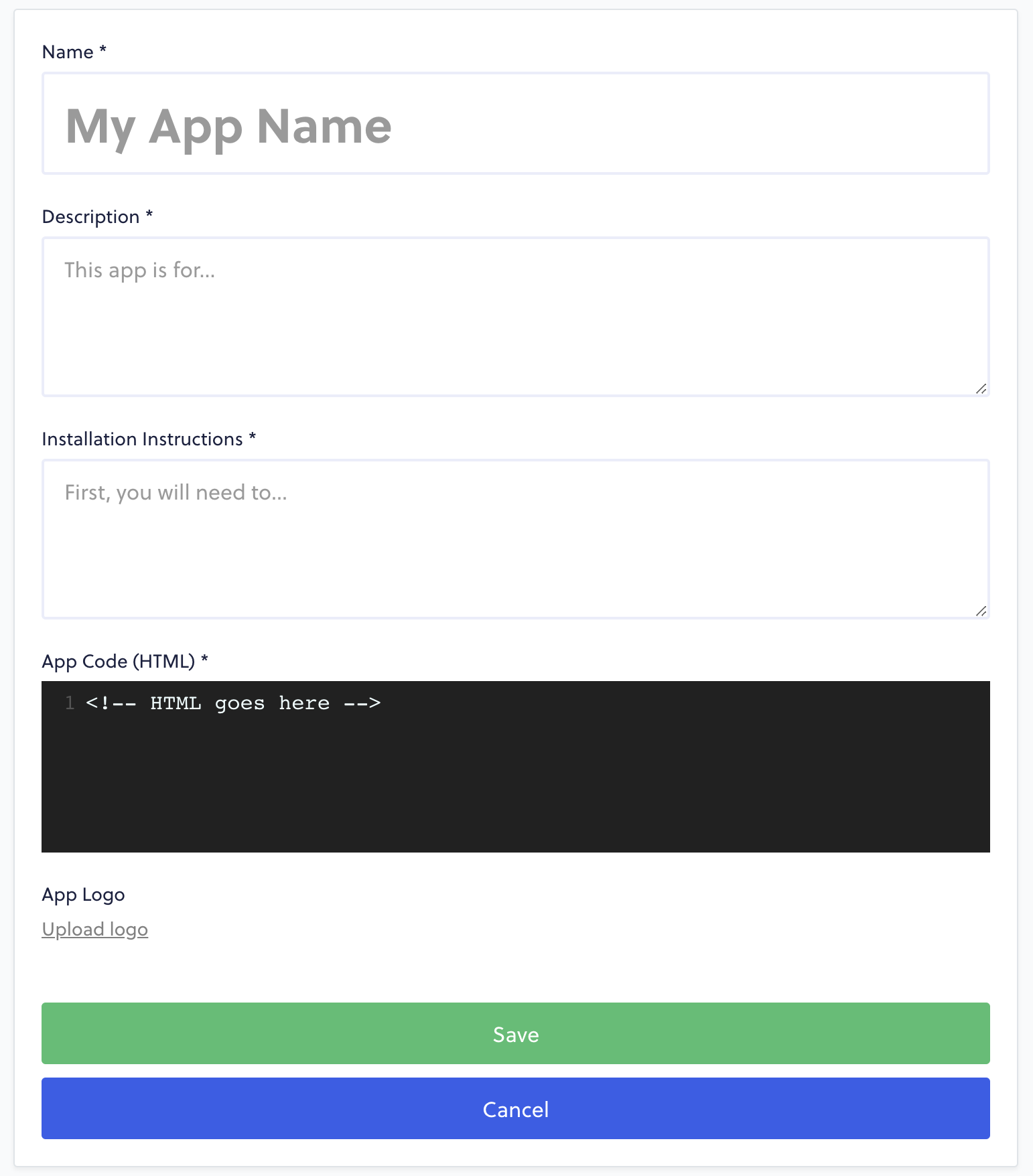
Start by giving your app a Name, Description, and Installation Instructions. If there are no extra steps to install your app (ie. registering an account on your website), then you can use "N/A" or "None" in the instructions field.
The App Code section is where you will place your HTML, JavaScript, or even CSS for your app. Just keep in mind that this field expects HTML, so if you're planning on writing CSS and JS inside of this editor, you'll need to wrap it in <style> and <script> tags, respectively.
Alternatively, you can choose to import a stylesheet or script file from elsewhere.
Example
This script would then populate the above "rebuy-example" div with all necessary code.
In some cases, loading an additional script will not be necessary if your script is already being loaded by way of that shop having your Shopify app installed.
You Can Revise App Code Later
This App Code doesn't need to be perfect before you submit the form. You'll be able to make revisions and restrict the app's access to specific merchant shops before it becomes visible to every Smart Cart.
Once you click Save, the form should submit and you will be immediately redirected to the Editor Interface for your app.
The Editor Interface looks similar to the Create New App page, except for the additional Merchant Visibility at the top of the screen. This section can be used to add merchant shops, which will make your app accessible to those shops' Smart Carts.
--- title: Building Your Smart Cart App excerpt: '' deprecated: false hidden: false metadata: title: '' description: '' robots: noindex next: description: >- Now you can set your Merchant Visibility to begin testing your app on a Shopify store. pages: - type: basic slug: adjusting-merchant-visibility-for-your-app title: Adjusting Merchant Visibility for your App --- ## Create The App To create a Smart Cart App start by creating your Rebuy Partners account [here](https://rebuyengine.com/partners/create). If you have already created one then [login](https://rebuyengine.com/partners/login). Once you are logged in, click on **Smart Cart Apps** in the left sidebar menu. Then, click **Create New App**. You will then see the following form:  Start by giving your app a **Name**, **Description**, and **Installation Instructions**. If there are no extra steps to install your app (ie. registering an account on your website), then you can use "N/A" or "None" in the instructions field. The **App Code** section is where you will place your HTML, JavaScript, or even CSS for your app. Just keep in mind that this field expects HTML, so if you're planning on writing CSS and JS inside of this editor, you'll need to wrap it in `<style>` and `<script>` tags, respectively. Alternatively, you can choose to import a stylesheet or script file from elsewhere. **Example** ```html <div id="rebuy-example"></div> <script src="https://cdn.rebuyengine.com/example.js"></script> ``` *This script would then populate the above "rebuy-example" div with all necessary code.* In some cases, loading an additional script will not be necessary if your script is already being loaded by way of that shop having your Shopify app installed. !!! note "You Can Revise App Code Later" This App Code doesn't need to be perfect before you submit the form. You'll be able to make revisions and restrict the app's access to specific merchant shops before it becomes visible to every Smart Cart. Once you click **Save**, the form should submit and you will be immediately redirected to the Editor Interface for your app. The Editor Interface looks similar to the Create New App page, except for the additional **Merchant Visibility** at the top of the screen. This section can be used to add merchant shops, which will make your app accessible to those shops' Smart Carts.